AI-Driven Defense for the EU

Designing an end-to-end intelligence workflow for investigators, from data collection to report generation.

Designing an end-to-end intelligence workflow for investigators, from data collection to report generation.

Role & Responsibility

UX/UI Design, UX Research, Interaction Design, Prototyping, Frontend

Industry

B2G / SaaS, Security & Intelligence

Year

2025 – Ongoing

Status

🔒 Work in Progress — Full case study available upon request

🔒 Partial case study — NDA applies

Backstory

OSINT (Open Source Intelligence) is the discipline of collecting and analyzing publicly available information, from social media accounts and government records to online directories, to assess threats, support decisions, or answer investigative questions.

Investigators currently rely on a fragmented set of external tools, requiring them to jump between platforms, lose context, and manually compile reports. This project set out to build a single, purpose-built platform that covers the full investigation lifecycle: search, analysis, reporting, and data sharing.

Note: Full client details and specific data are confidential at this stage.

Problem & Challenge

The core problem: Investigators lose significant time and focus switching between tools. Each context switch interrupts the flow of an investigation and increases the risk of missing connections between data points.

Design challenge: How do you design a high-density, data-heavy platform that keeps investigators in flow, moving forward, not back , while reducing cognitive load throughout a complex, non-linear process?

Key constraints:

  • Users are professional investigators (not casual users), efficiency and precision are non-negotiable

  • Data is sensitive and subject to strict interoperability requirements

  • The platform must support both structured workflows and exploratory, non-linear investigation paths

Design Approach

The platform was structured around 6 core epics, each addressing a distinct phase of the investigation lifecycle:

  1. Authentication — Secure, simple login

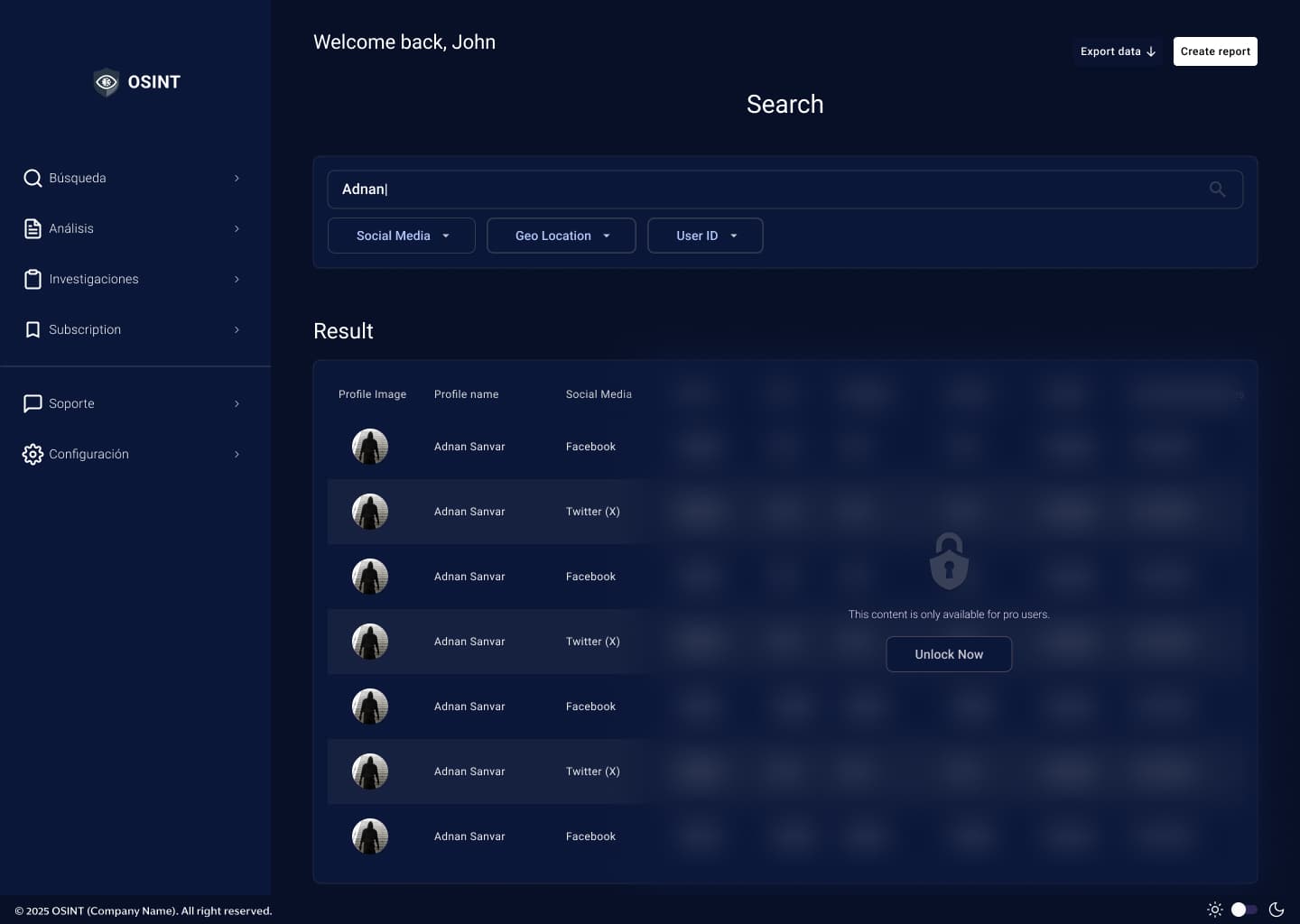
  2. Data Search & Collection — Centralized search with advanced filters across 9+ data source types (social media, dark web, email, mobile, business registries, and more)

  3. Data Analysis — Interactive relationship graph with node-based exploration; investigators can branch the investigation directly from the graph without returning to search

  4. Investigations — Cloud-based investigation repository with unique IDs, replacing local file storage

  5. Notebook & Reporting — Collapsible in-app notebook with semi-automatic report generation, removing the need for external word processors

  6. Exchange & Interoperability — Multi-format export and sharing, including machine-to-machine transmission to external systems (ATAK)

Core design principle: The user should never need to go back to continue moving forward.

Problem & Challenge

The core problem: Investigators lose significant time and focus switching between tools. Each context switch interrupts the flow of an investigation and increases the risk of missing connections between data points.

Design challenge: How do you design a high-density, data-heavy platform that keeps investigators in flow, moving forward, not back, while reducing cognitive load throughout a complex, non-linear process?

Key constraints:

  • Users are professional investigators (not casual users), efficiency and precision are non-negotiable

  • Data is sensitive and subject to strict interoperability requirements

  • The platform must support both structured workflows and exploratory, non-linear investigation paths

Research & Insights

Key themes that emerged from discovery:

  • Flow interruption is the biggest pain point, investigators frequently need to go back to earlier steps, losing context

  • Report generation is done entirely outside existing tools, creating duplication of work

  • Data interoperability (sharing with other systems and colleagues) is a recurring friction point

  • Users need to feel in control of where they are in an investigation at all times

Design Approach

The platform was structured around 6 core epics, each addressing a distinct phase of the investigation lifecycle:

  1. Authentication — Secure, simple login

  2. Data Search & Collection — Centralized search with advanced filters across 9+ data source types (social media, dark web, email, mobile, business registries, and more)

  3. Data Analysis — Interactive relationship graph with node-based exploration; investigators can branch the investigation directly from the graph without returning to search

  4. Investigations — Cloud-based investigation repository with unique IDs, replacing local file storage

  5. Notebook & Reporting — Collapsible in-app notebook with semi-automatic report generation, removing the need for external word processors

  6. Exchange & Interoperability — Multi-format export and sharing, including machine-to-machine transmission to external systems (ATAK)

Core design principle: The user should never need to go back to continue moving forward.

Screens (Work in Progress)

Areas to be shown:

  • Search & collection interface

  • Relationship graph (analysis view)

  • Node detail pop-up

  • Subscription

  • Notebook / report builder

  • Consumer usage dashboard

  • Support page

Key Design Decisions

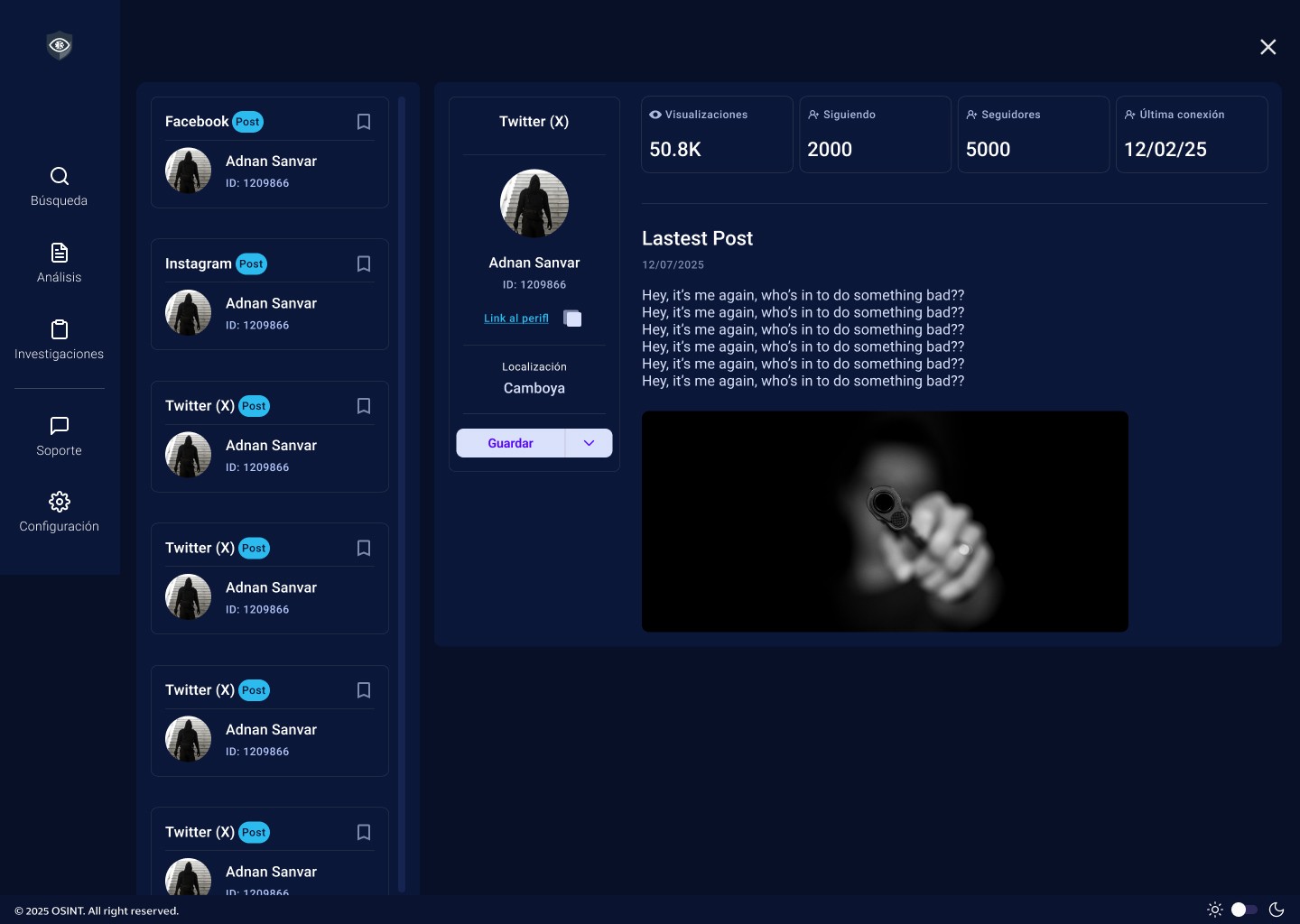
Split-panel search results Rather than navigating away to view a profile, investigators see results on the left and expanded profile detail on the right, preserving search context at all times.

Node-based relationship graph The analysis screen uses an interactive graph where investigators can click to view profile details and double-click to expand relationship branches, extending the investigation without leaving the analysis context.

Collapsible notebook A persistent, collapsible notebook panel allows investigators to build their report in parallel with their investigation, items saved from search and analysis populate automatically, reducing manual duplication.

Always-visible investigation ID The current investigation ID is permanently anchored in the UI, ensuring investigators always know which case they are working on.

Subscription-based monitoring Rather than requiring investigators to repeatedly run manual searches, the Subscription screen lets them track keywords, names, or case IDs across multiple source types simultaneously , News, Social Media Posts, and Social Media Profiles, all updating in a single view. New results are flagged in real time, so investigators stay informed without breaking their active investigation flow.
Results & Reflections

[To be updated upon project completion and client approval]

What worked well:

  • Designing around a strict "no going back" principle gave every screen a clear directional purpose

  • The collapsible notebook concept was well-received in early reviews as a genuine workflow improvement over external tools

Learnings so far:

  • High-density, data-heavy interfaces require extra investment in information hierarchy, the challenge is not what to show, but what to deprioritize

  • Designing for expert users is different from designing for general audiences, efficiency and shortcut-ability matter more than hand-holding

Next steps:

  • Usability testing with target users

  • Iteration on the reporting and export flows

  • User manual design (PDF format, optimized for print, target users include law enforcement and military personnel)

Full case study available in an interview or upon request. Last updated: May 2026

Search & collection interface

Open search result
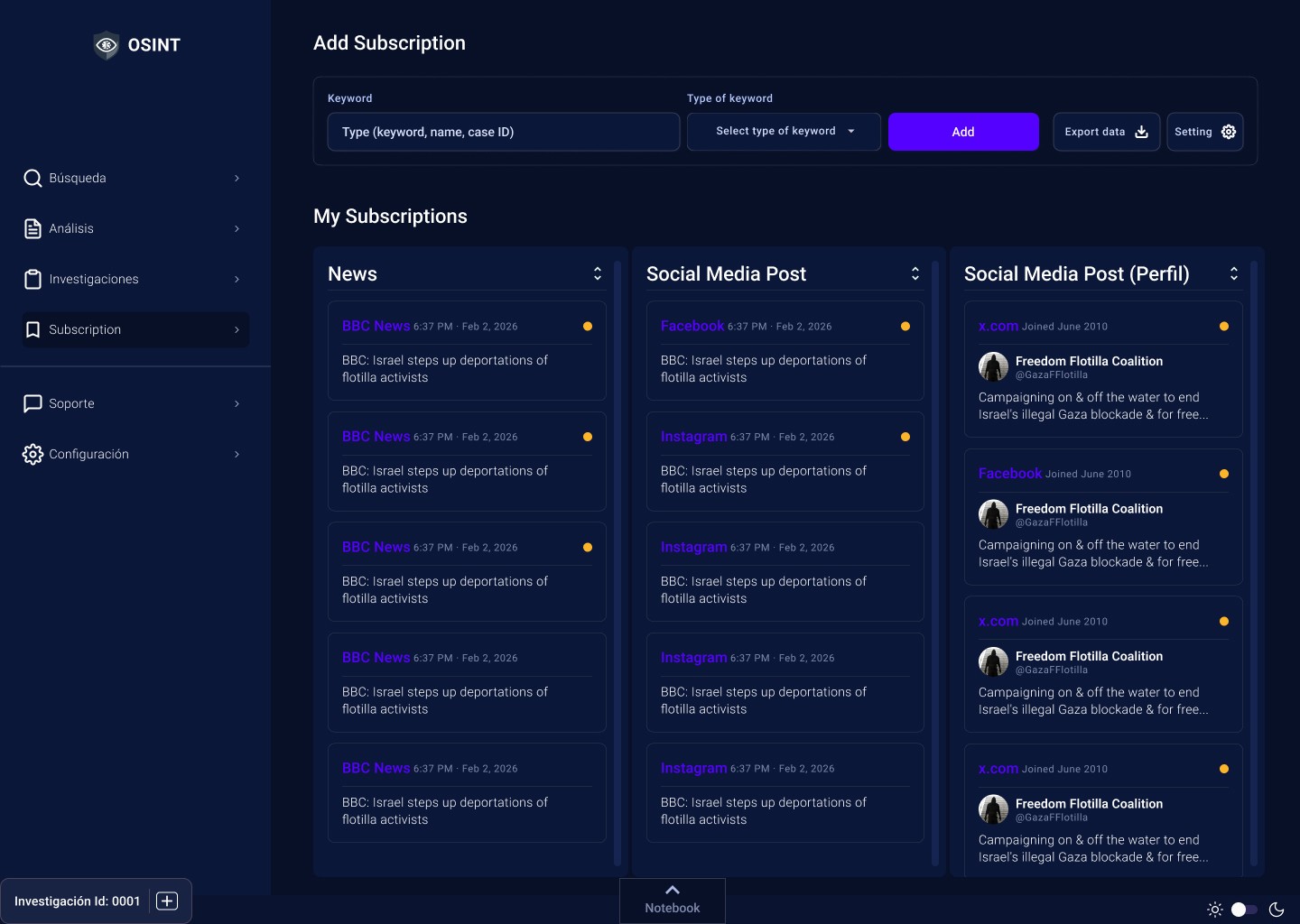
Subscription
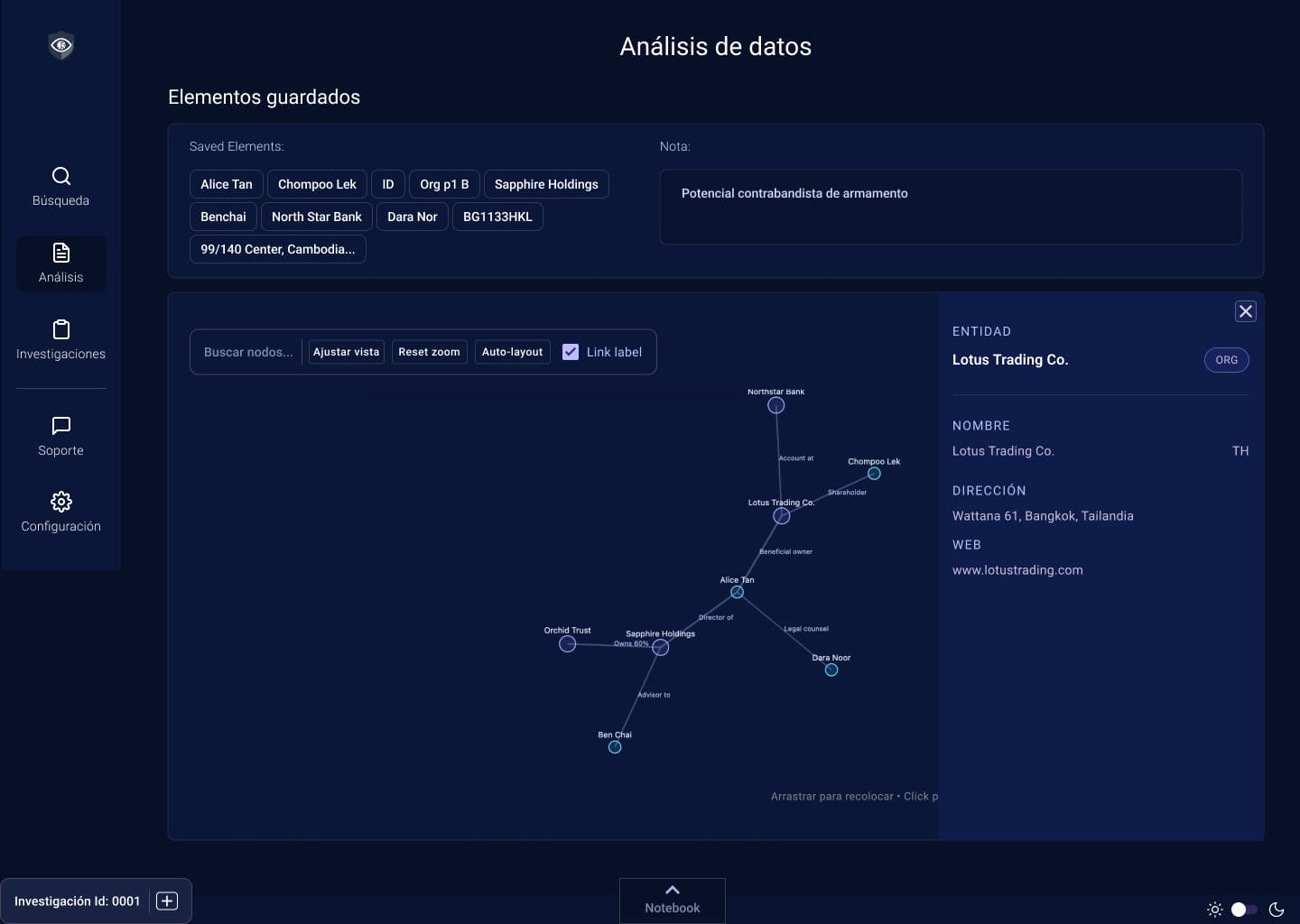
Relationship graph (analysis view) 1
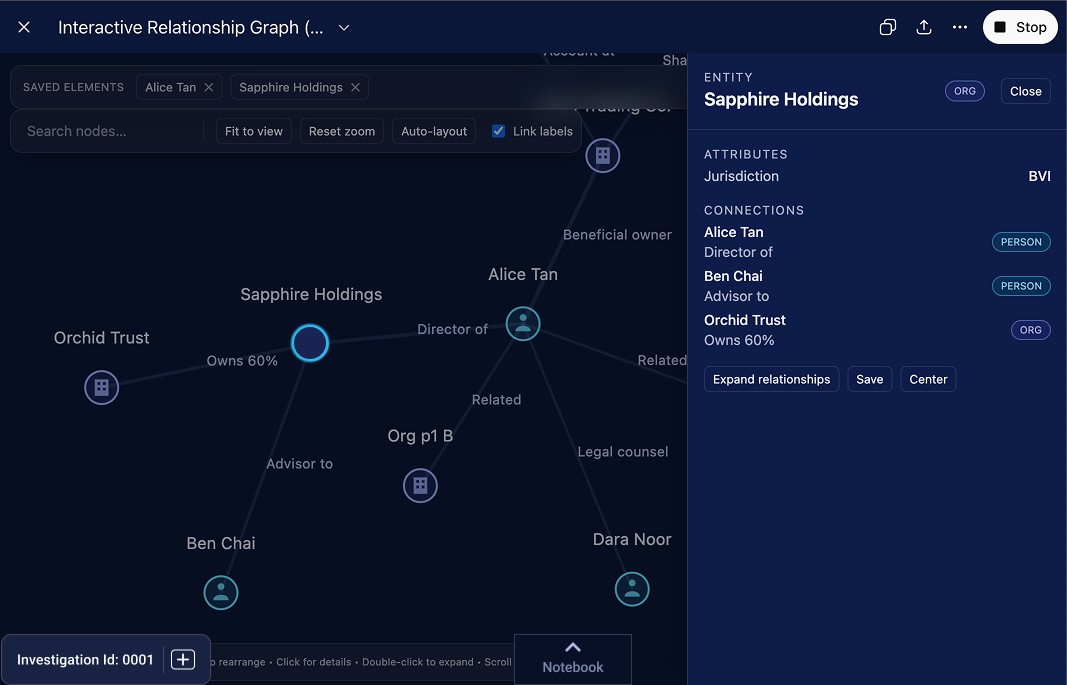
Relationship graph (analysis view) 2
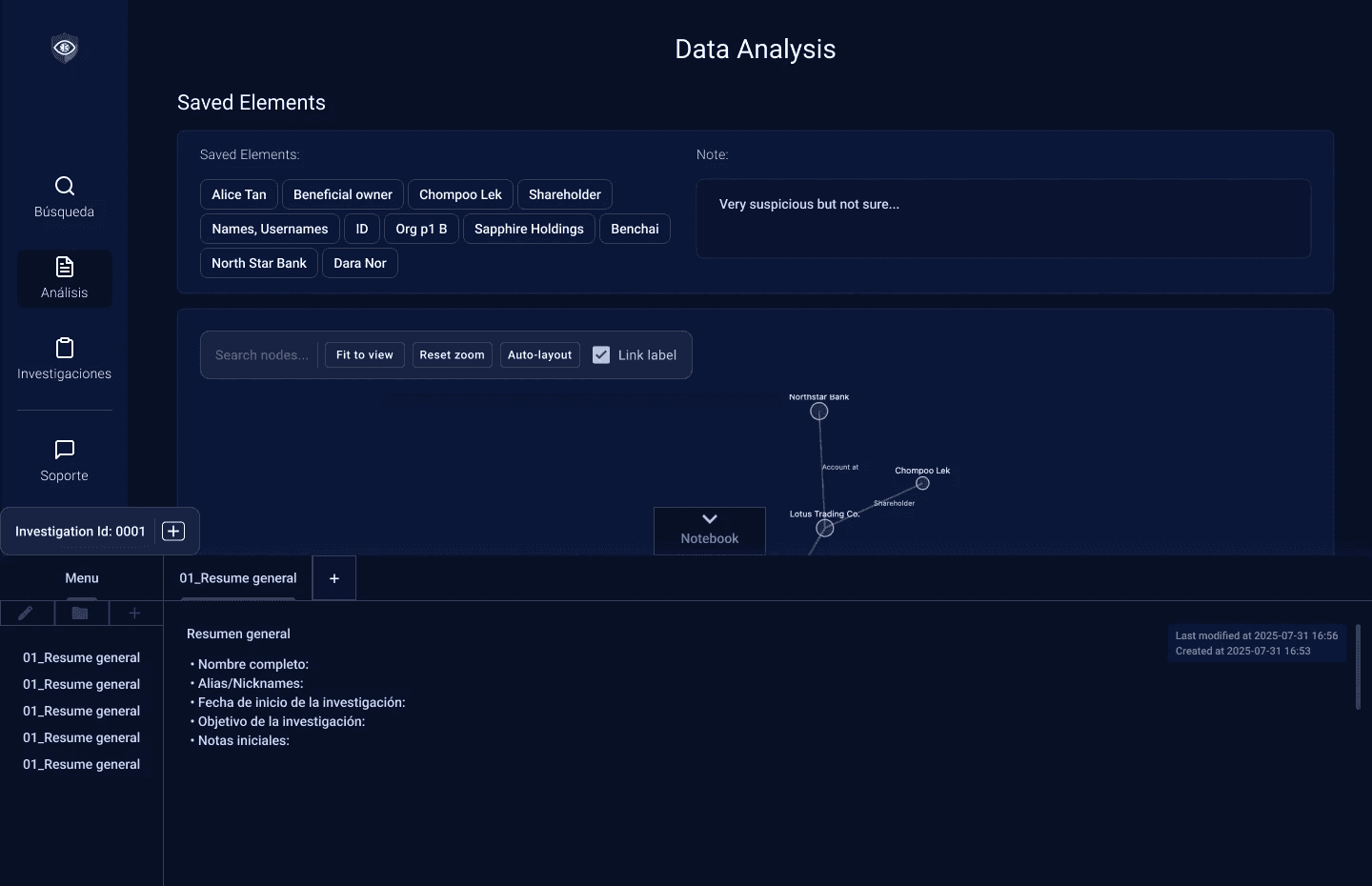
Open notebook

Results & Reflections

[To be updated upon project completion and client approval]

What worked well:

  • Designing around a strict "no going back" principle gave every screen a clear directional purpose

  • The collapsible notebook concept was well-received in early reviews as a genuine workflow improvement over external tools

Learnings so far:

  • High-density, data-heavy interfaces require extra investment in information hierarchy, the challenge is not what to show, but what to deprioritize

  • Designing for expert users is different from designing for general audiences, efficiency and shortcut-ability matter more than hand-holding

Next steps:

  • Usability testing with target users

  • Iteration on the reporting and export flows

  • User manual design (PDF format, optimized for print, target users include law enforcement and military personnel)

Full case study available in an interview or upon request. Last updated: May 2026